Quick answer
Your first year with solar establishes the baseline for how the system performs at your home. Expect production to change with daylight, weather and season. You will usually continue receiving a utility bill, and you may also have a separate loan, lease or solar-energy payment depending on your agreement. Use your monitoring data, utility statements and project documents together, then review a full 12 months before drawing conclusions from one unusually sunny, cloudy, hot or high-usage month.
The system turning on is the beginning of a new operating routine, not the end of the solar process. During the first year, homeowners learn how solar production, household electricity use, utility credits and their payment agreement appear across different statements and apps.
The most useful goal is not to watch one number every day. It is to build a reliable record, recognize normal variation and know which changes deserve follow-up.

Start with activation and permission to operate
Solar panels may be physically installed before the system is approved to operate with the utility grid. Local inspection and utility interconnection steps generally must be completed before normal operation begins. Follow the installer’s instructions and do not turn equipment on or change settings before authorization.
When the system is activated, keep the confirmation message or project record. Also confirm that you can access the monitoring platform and that the system appears under the correct account. These records create a clear starting date for the first-year review.
First-week setup
- Save the permission-to-operate or activation notice.
- Set up monitoring access and alert notifications.
- Keep the final agreement, system design, warranties and service contacts together.
- Record the utility billing cycle and any net-metering or export-credit program shown on the account.
For the steps that occur before activation, review Trinity’s solar installation process from consultation through permission to operate.
What bills will you receive after going solar?
Going solar does not usually end the relationship with the utility. A grid-connected home can still import electricity at night, during low-production periods or whenever household demand exceeds current solar production. Utility fixed charges, taxes and other non-energy charges may also remain.
The other payment depends on how the system was purchased. It is more accurate to think in terms of a utility statement plus the applicable solar payment—not automatically “two electric bills.”
| Payment method | What may arrive each month | What to verify |
|---|---|---|
| Cash purchase | Utility statement; no recurring system payment from the purchase itself | Utility imports, exports, credits and fixed charges |
| Solar loan | Utility statement plus the loan payment | Payment amount, due date, term and any rate or payment changes |
| Lease | Utility statement plus the lease payment | Escalator, service terms and payment schedule in the agreement |
| Power purchase agreement | Utility statement plus a charge for solar electricity under the agreement | Energy rate, production shown and any annual rate change |
Read the final agreement for the terms that apply to your system. A low utility bill does not show the complete monthly cost if a separate solar payment exists, and a solar payment does not replace every utility charge.
How to read the utility bill after solar
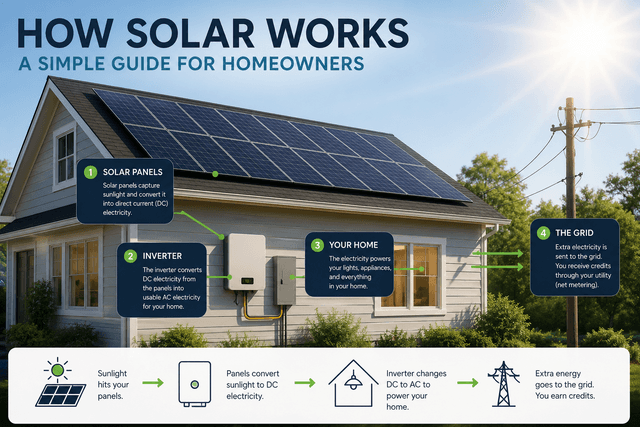
A monitoring app and a utility statement measure different parts of the energy flow. The monitoring platform commonly reports what the solar system produced. The utility meter generally records electricity exchanged with the grid. Neither number by itself necessarily shows the home’s total electricity use.
Solar production
Electricity generated by the solar system during the reporting period.
Grid imports
Electricity the home receives from the utility when solar does not cover current demand.
Grid exports
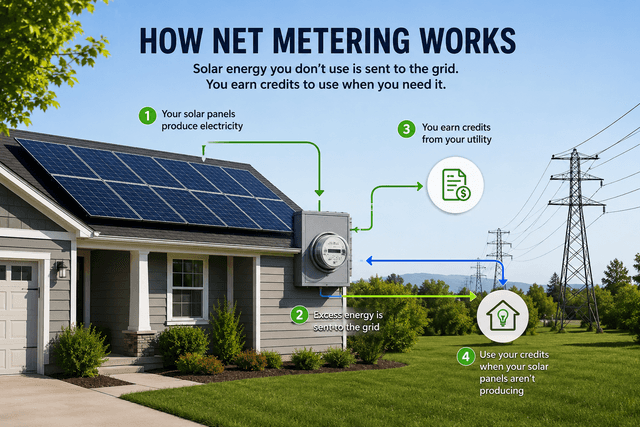
Excess solar electricity sent to the grid, subject to the utility’s program and credit rules.
Billing terminology and credit value vary by state, utility and program. Some statements show separate delivered and received energy lines. Others calculate a net amount or carry credits forward. The first statement after activation may also cover a partial operating period, so it may not be a useful full-month comparison.
If exports or credits do not appear when expected, confirm the activation date, meter setup, billing period and program enrollment with the appropriate utility or service contact. Trinity’s guide to net metering and solar credits explains the concepts and the questions to ask.
Why solar production changes during the year
Monthly production is not expected to be identical. Day length, sun angle, cloud cover, temperature, snow, shade and system design all affect output. Household use also changes as heating, cooling, school schedules, travel and new appliances change.
That means a higher utility bill does not automatically prove the solar system produced less. The household may simply have used more electricity. In the same way, a cloudy month can reduce production without indicating an equipment problem.
Use annual estimates correctly
A proposal’s first-year production estimate is a model, not a guaranteed monthly schedule unless the agreement says otherwise. Compare actual results with the same period in the model when available, and review the complete agreement before deciding whether a performance commitment applies.
A full 12 months creates a better baseline because it includes every season. It still does not remove weather differences, usage changes or utility-rate changes, but it gives a more complete view than one or two bills.
How to monitor the system without overreacting
Monitoring can help confirm that the system is reporting production and can surface alerts or unusual changes. Daily numbers will rise and fall, so compare similar conditions and longer periods before assuming something is wrong.
| What you notice | Possible context | Next step |
|---|---|---|
| Production changes from one day to the next | Weather, daylight and household conditions vary | Review a longer period and similar weather before escalating |
| An app stops updating | Internet, gateway or data connection may be interrupted | Follow the monitoring guidance; do not assume generation has stopped |
| Zero or sharply lower production persists | Equipment, shade, weather, outage or reporting issue may require diagnosis | Document the dates and alerts, then contact the appropriate service provider |
| The utility bill rises | Usage, rates, fixed charges, credits or production may have changed | Compare kWh, billing dates, rate details and monitoring data together |
Do not climb onto the roof or handle electrical equipment to investigate. Use the approved monitoring and service process. For safe upkeep guidance, read solar panel maintenance, monitoring and damage.
Your first-year solar checklist
Activation through month 1
- Confirm monitoring access and notifications.
- Save activation and utility program records.
- Check the first bill’s operating dates before comparing it with a full month.
Months 2 through 3
- Confirm utility imports, exports or credits are displayed as expected.
- Review solar and utility payments against the agreement.
- Record any unresolved billing or monitoring questions.
Months 4 through 11
- Watch monthly and seasonal patterns rather than isolated days.
- Note major usage changes, tree growth, storms or roof work.
- Keep utility statements and monitoring exports when available.
At 12 months
- Total the year’s production and review the contract estimate.
- Compare utility kWh, rates, credits and major usage changes.
- Review warranty, service and payment records for the next year.
When to contact support
Ask for help when a monitoring alert, zero-production reading or unusual change persists after obvious weather and reporting issues are ruled out. Also contact the appropriate provider if the utility account does not show the expected solar program, a payment differs from the agreement or severe weather causes visible damage.
Keep screenshots, dates, utility statements and error messages. The service contact may be the installer, equipment manufacturer, monitoring provider, finance company or utility depending on the issue and agreement. Review the current solar warranty guide to understand why equipment, labor and service responsibilities can differ.
Build the baseline you will use later
Keep the first year’s production, bills, credits, payment records and major household changes together. That history makes future year-to-year comparisons more useful and gives a service team better evidence if a problem appears.
The bottom line
Your first year with solar is a learning and measurement period. Production will vary, utility bills may still include imported electricity and fixed charges, and a separate solar payment may apply under the agreement.
Use monitoring data, utility statements and project documents together. Track the full year, investigate persistent changes and keep clear records. That gives you a realistic picture of how the system operates at your home.